Privacy and UX
Is a Chrome Extension Safe for Freelancers? A 2026 Privacy and UX Checklist
A practical 2026 checklist for freelancers evaluating Chrome extensions: permissions, remote code, open source, privacy consent, free trials, clean UX, and founder trust.


A Chrome extension can be a useful freelance tool because it sits exactly where your work happens: inside the browser.
That is also why it deserves more scrutiny than a normal website.
If an extension runs on your freelance marketplace, CRM, inbox, or client research tabs, it may be able to read page content, add UI, store workflow data, and communicate with a service. That does not make the extension unsafe by default. It means trust should be evaluated before convenience.
This is the checklist I would use as a freelancer before installing any browser extension that touches my work pages.
It is also the checklist we try to apply while building Upwork Goldmine.
Why extension trust matters more in 2026
Freelancers now work with a stack of browser tools: proposal helpers, AI writing assistants, job filters, grammar tools, time trackers, screenshot tools, CRM sidebars, and research extensions.
The browser has become the operating system for freelance work.
That makes browser extensions powerful, but also sensitive. Chrome's own extension security guidance says extensions have special browser privileges and should minimize permissions because less privilege means less exposure if something goes wrong. Chrome's privacy guidance also says users are less likely to install extensions that ask for more permissions than the product appears to need.
Sources: Chrome extension security guidance and Chrome user privacy guidance.
The useful question is not "Can I trust every extension in the Chrome Web Store?"
The useful question is: Does this specific extension explain why it needs access, what it does with data, and what it refuses to do?
The 9-point Chrome extension safety checklist for freelancers
Use this before installing an extension that runs on Upwork, Fiverr, LinkedIn, Gmail, client dashboards, or any work page.
| Check | Strong signal | Caution signal |
|---|---|---|
| Single purpose | The extension solves one clear workflow problem. | It claims to do everything and needs broad access. |
| Permissions | Permissions match the actual feature. | It asks for unrelated tabs, all-site access, or powerful APIs without explanation. |
| Remote code | Extension logic is bundled and reviewable by Chrome. | It fetches commands, scripts, or logic from a server at runtime. |
| Data minimization | It asks only for what the service needs. | It collects name, profile, phone, location, or payment details without a clear reason. |
| Consent | Consent is specific, visible, and not bundled with marketing. | The checkbox hides broad data use inside legal links. |
| Trial and pricing | You can try the core value without a card upfront. | You must pay or enter card details before understanding the tool. |
| Open source or auditability | Code, policies, or extension declarations make behavior easier to inspect. | The product gives no meaningful way to verify claims. |
| Clean UX | It reduces work anxiety and explains states clearly. | It adds clutter, urgency, confusing popups, or dark patterns. |
| Honest limits | It says what it cannot guarantee. | It promises jobs, income, interviews, or "AI certainty." |
No single row proves safety. The pattern matters.
1. Start with permissions, not promises
Most users read the sales copy first. For extensions, read the permissions story first.
Chrome recommends requesting only permissions that support the extension's main functionality. Chrome also explains that some permissions trigger warnings, and users are more likely to install extensions with limited, relevant warnings.
Source: Chrome permission warning guidelines.
For a freelance extension, ask:
- Does it need access to every website, or only the work sites it supports?
- Does it need to read visible page content, or is it asking for deeper browser access?
- Does the Chrome Web Store listing explain the permissions in plain language?
- If the feature changes later, will the new permission be visible to users?
For example, an Upwork job-filtering extension may reasonably need to run on Upwork search and job pages. It does not automatically need access to Gmail, banking sites, social media, or every page you visit.
Permission fit
- Encouraging
- The permission matches the visible feature: the extension runs on the marketplace pages where it helps you work.
- Look closer
- The permission feels broader than the feature, or the store listing never explains why the access is needed.
- Use it for
- Deciding whether the extension's access is proportional to its value.
2. Treat "no remote code" as a serious trust signal
This is one of the most important checks.
Chrome Web Store's Manifest V3 requirements say the extension's functionality should be discernible from submitted code, and external resources must not contain extension logic except for narrow documented cases. Chrome also says Manifest V3 extension logic must be part of the extension package and cannot load and execute remotely hosted files as extension code.
Sources: Chrome Web Store MV3 requirements and Chrome guidance on removing remotely hosted code.
In plain English: if an extension can download new logic from a remote server and run it inside the extension, the code you installed may not be the code that keeps running tomorrow.
Remote services are not automatically bad. A paid extension may need a server for account access, billing status, sync, feedback, or announcements. The key distinction is:
- Safer pattern: extension code is bundled; server responses are data or service responses.
- Riskier pattern: server responses decide or execute new extension logic like hidden scripts, commands, or interpreters.
That is why the Chrome Web Store remote-code declaration is not a boring formality. It is a meaningful security line.
3. Open source helps, but it is not a magic shield
An open-source extension can feel safer because developers, users, or security-minded people can inspect the code and spot suspicious behavior.
That is a real advantage.
But open source is not enough by itself. You still need to ask:
- Is the code in the public repository the same code shipped to the store?
- Is the extension actively maintained?
- Are releases tagged and understandable?
- Are permissions still minimal?
- Does the product avoid runtime remote logic?
- Does the privacy policy match the code behavior?
For closed-source extensions, the bar is higher. The product should compensate with clear permissions, clear privacy language, honest data categories, strong support identity, visible founder or company details, and a product experience that does not pressure the user into blind trust.
4. Check what data the extension really needs
Chrome's user-data FAQ is broad: user data can include email, authentication information, website content, form data, browsing activity, user-generated content, and more. It also says extensions must disclose user-data handling even when data is processed or stored locally on the user's device.
Source: Chrome Web Store user data FAQ.
For freelance tools, data minimization should feel practical:
- Email may be needed for account access, OTP login, trials, subscriptions, and service emails.
- Visible job or client signals may be needed for filtering.
- Notes may be needed for a pursuit board or CRM-like workflow.
- Billing references may be needed for subscription status and refunds.
But many things should raise questions:
- Why does a proposal helper need your phone number?
- Why does a job filter need your home address?
- Why does a free trial require card details before you can see whether the workflow helps?
- Why does a browser extension need to collect unrelated browsing activity for advertising?
The best privacy posture is not "we collect nothing" if the product clearly needs some data to work. The better posture is: we collect only what the feature and compliance genuinely require, and we explain why.
5. Consent should not smuggle marketing into service access
Consent is where many products lose trust.
As users, we have all seen consent screens that effectively say: accept everything now, then maybe find the opt-out later. Research on privacy UX and dark patterns continues to show why this matters. A 2026 systematic review of dark-pattern experiments found that manipulative interface patterns can significantly alter user behavior. A 2026 privacy-UX paper also frames privacy as something that starts in interface design, not only in policy documents.
Sources: Systematic review of dark-pattern experiments and Privacy Starts with UI.
For a freelance extension, good consent should be specific:
- Terms and Privacy Policy are visible before acceptance.
- The checkbox is not preselected.
- Marketing consent is separate from essential service messages.
- The product does not require your name if an email account is enough.
- Legal links open without destroying the login flow.
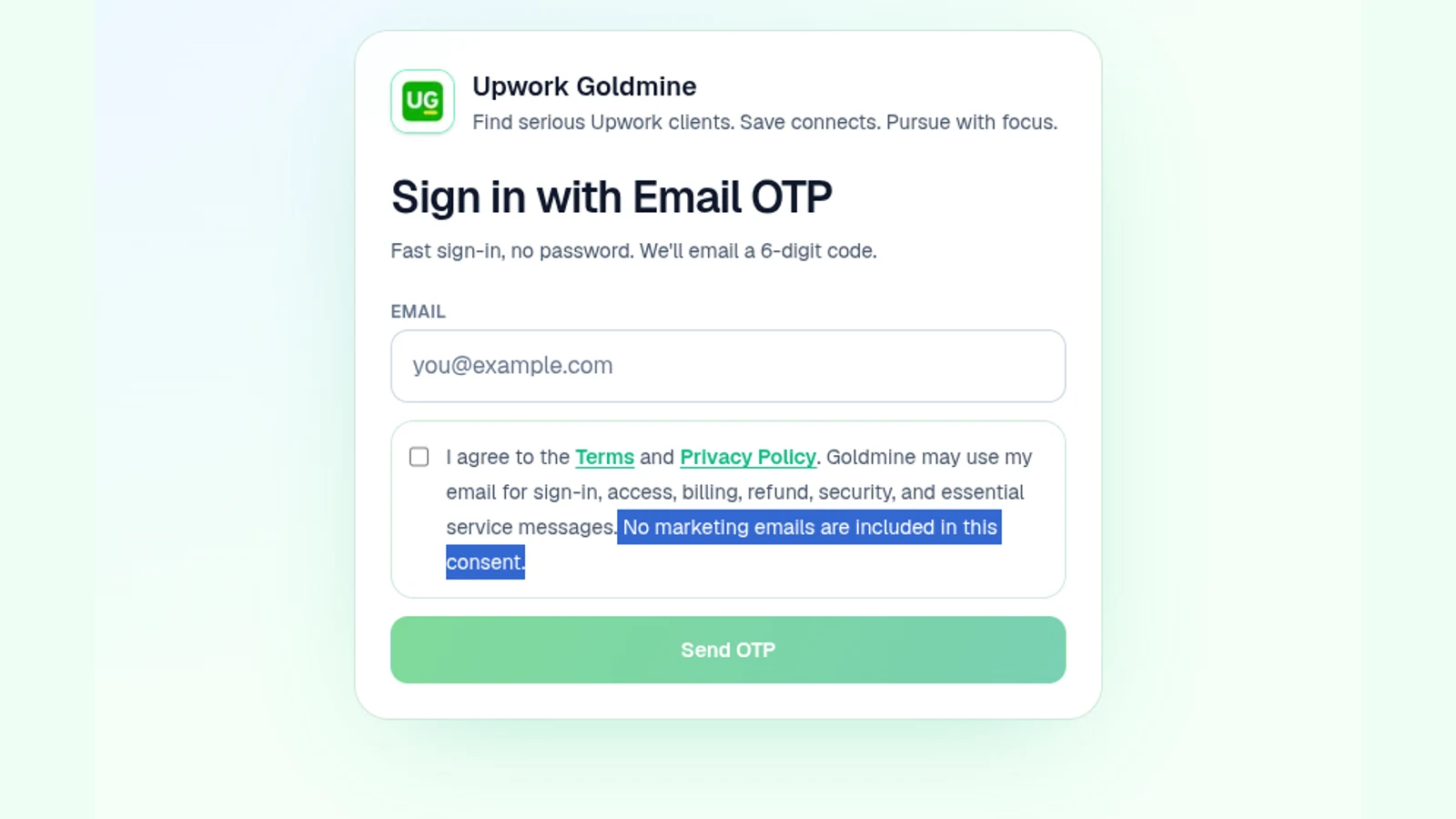
In Upwork Goldmine, the login screen asks for email OTP access and says the email may be used for sign-in, access, billing, refund, security, and essential service messages. It also states that marketing emails are not included in that consent.
That is not a fancy feature. It is a product decision.
6. Free to try without a card upfront is part of trust
For early freelance tools, a no-card trial can be more than a conversion tactic. It can be a trust signal.
Freelancers do not always know whether a workflow tool fits their niche, price band, proposal style, or platform habits until they try it on real work. Asking for a card before the user has seen the value creates friction and suspicion.
A reasonable trial model should answer:
- Can I test the core workflow before paying?
- Is the trial length clear?
- Is cancellation understandable?
- Are refund rules visible if payment is involved?
- Does the product avoid fake scarcity or pressure timers?
Paid products are fine. Developers need revenue to maintain serious tools. But the buying experience should feel like a calm evaluation, not a trap.
7. Clean UI is not cosmetic when the user is anxious
Freelancers often use tools while under pressure: low response rates, expensive Connects, deadline anxiety, uncertain income, or too many similar job posts.
In that state, clutter is not just ugly. It costs judgment.
A thoughtful freelance extension should:
- Make the next action obvious.
- Avoid covering the page unnecessarily.
- Explain empty states instead of leaving the user confused.
- Let users pause, resume, hide, or revisit work.
- Avoid noisy gamification when the decision involves money or reputation.
For Upwork workflows, clean UX means helping the freelancer move from search to judgment to pursuit. The tool should reduce panic applying, not add another dashboard that demands attention.
Search
Start from the user's existing marketplace workflow instead of forcing a separate research ritual.
Filter
Use visible client and job signals to reduce noise before proposal effort begins.
Pursue
Preserve shortlisted jobs, notes, decisions, and follow-up context so good leads do not vanish into scrolling.
Review
Keep the final decision with the freelancer. A tool can prioritize attention, but it should not pretend to guarantee outcomes.
8. Honest limitations are a credibility feature
Be careful with tools that promise:
- guaranteed jobs
- guaranteed interviews
- guaranteed profile views
- "AI-selected winning proposals"
- automated bidding without judgment
- hidden client information the user cannot verify
Freelance work has too many variables: client intent, timing, budget, proof, competition, proposal quality, pricing, platform changes, and luck.
A trustworthy tool can improve process quality. It should not pretend to control client decisions.
Goldmine's positioning is deliberately narrower: find serious Upwork clients, save Connects, and pursue with focus. The extension filters visible signals and helps organize pursuit. It does not submit proposals, scrape private messages, automate bidding, or guarantee earnings.
9. How Upwork Goldmine applies this checklist
This section is a founder disclosure: I built Upwork Goldmine. Use the checklist above to evaluate Goldmine and any competing tool with the same standard.
| Trust question | Goldmine's current approach |
|---|---|
| What is the single purpose? | Help freelancers filter visible Upwork job/client signals and organize stronger opportunities in a Pursuit Board. |
| What permissions does it use? | storage, sidePanel, Goldmine backend access, and content scripts on supported Upwork and Goldmine pages. |
| Does it use remote extension code? | The Chrome Web Store declaration says no remote code; extension JavaScript is bundled in the submitted package. |
| Does it ask for an Upwork password? | No. Goldmine does not ask for your Upwork password. |
| What does login require? | Email OTP. No name is required at sign-in. |
| Is marketing bundled into login consent? | No. The login consent covers Terms, Privacy Policy, and essential service messages, not marketing emails. |
| Can users try before paying? | Yes. Goldmine currently offers a free trial without requiring card details upfront, subject to access limits. |
| Does it guarantee results? | No. It highlights signals and supports discipline; the freelancer makes the final decision. |
A quick pre-install checklist
Before installing any freelance Chrome extension, ask these 12 questions:
- What exact workflow problem does it solve?
- Which websites can it run on?
- Are the permissions proportional to the feature?
- Does it say whether extension logic is bundled or remotely executed?
- Does it ask for credentials it should not need?
- What account data does it collect?
- What work-page content does it read or store?
- Is the privacy policy specific enough to understand?
- Is consent visible before data handling begins?
- Is marketing consent separate from service access?
- Can you try the value before entering payment details?
- Does the UI make you calmer and clearer, or more pressured?
If the answers feel evasive, wait.
If the answers are specific, proportional, and consistent with the product's behavior, then the extension deserves a closer look.
Sources and further reading
- Chrome Web Store Manifest V3 remote-code requirements
- Chrome extension security guidance
- Chrome extension user privacy guidance
- Chrome permission warning guidelines
- Chrome Web Store user-data FAQ
- Google guide to generative AI search optimization
- Google guidance on helpful, reliable, people-first content
- Privacy Starts with UI: Privacy Patterns and Designer Perspectives in UI/UX Practice
- A Systematic Review of User Experiments Measuring the Effects of Dark Patterns